Table of Contents
ToggleHome energy management has shifted from a nice-to-have feature to a practical necessity for modern homeowners. Rising utility costs and the growing ecosystem of smart devices demand better control over how power flows through a home. The Anker Smart Home Power Kit enters this space as a modular solution designed for renters and homeowners alike, no hardwiring, no electrician required. This guide breaks down what the kit includes, how it functions, and whether it’s the right fit for your home automation goals.
Key Takeaways
- The Anker Smart Home Power Kit is a plug-and-play energy management system that requires no hardwiring, electrician, or permanent modifications, making it ideal for renters and homeowners seeking flexible automation.
- Matter protocol support ensures the kit works seamlessly with Apple HomeKit, Google Home, Amazon Alexa, and other major platforms, future-proofing your smart home investment.
- Real-time energy monitoring helps identify high-consumption devices and phantom loads, potentially reducing energy bills by 5-10% through better visibility and control.
- The modular design scales from 3-5 outlets up to 20+ on a single hub, allowing homeowners to expand room by room as their smart home needs grow.
- Setup takes just 15-30 minutes with no tools required—simply position the hub near your router, download the app, pair outlets, and configure schedules and automation triggers.
- The Anker Smart Home Power Kit is unsuitable for 240V appliances like dryers and ovens; it handles only standard 120V circuits up to 15 amps per outlet.
What Is the Anker Smart Home Power Kit?
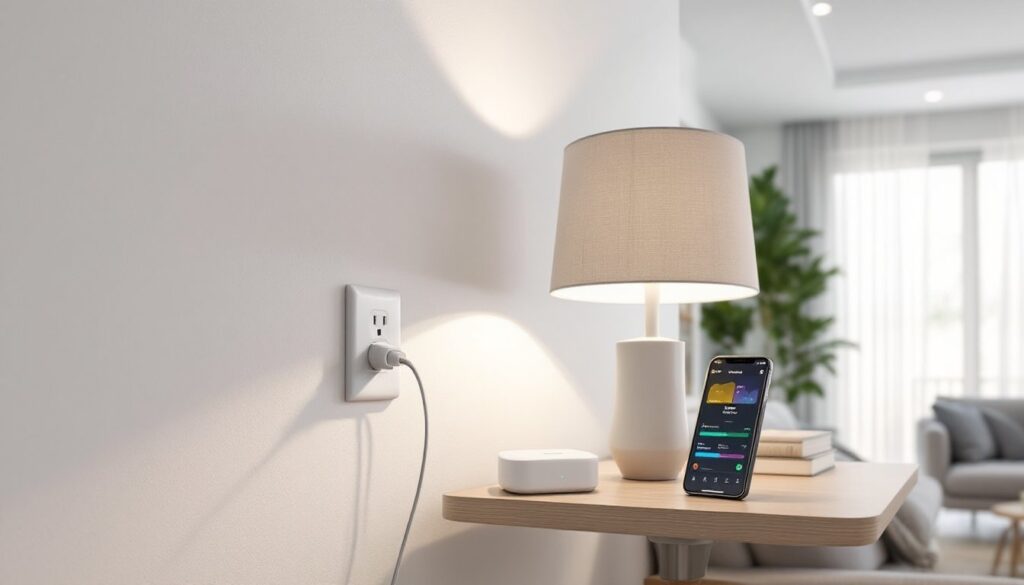
The Anker Smart Home Power Kit is a plug-and-play energy management system that combines smart outlets, power monitoring, and automation control in a single ecosystem. Unlike traditional smart plugs that operate independently, this kit functions as an integrated network, allowing users to monitor and control multiple devices from one central interface.
The system includes Anker smart outlets with built-in energy monitoring, a control hub that connects to the home network, and a mobile app for remote access. Each outlet tracks real-time power consumption, letting users identify which devices draw the most energy. The kit supports Matter protocol, the industry-standard communication language that allows it to work seamlessly with Apple HomeKit, Google Home, Amazon Alexa, and other platforms.
What sets this apart from individual smart plugs is the unified approach. Instead of managing five separate plug apps, users control everything through one dashboard. The kit arrives pre-configured, so setup involves plugging in the hub, connecting it to Wi-Fi, and pairing the outlets, no electrical work, no permit requirements, and no permanent modifications to the home’s wiring.
Key Features That Set the Anker Power Kit Apart
Matter Protocol Support
The kit’s Matter compatibility means it speaks the same language as virtually every major smart home platform released since 2023. Homeowners aren’t locked into a single ecosystem. If someone switches from Alexa to Google Home, the kit continues working without reconfiguration.
Real-Time Energy Monitoring
Each outlet tracks power consumption down to the watt. The app displays current draw, daily usage, and estimated monthly costs based on local utility rates. This visibility helps identify phantom loads, devices that pull power even when “off,” like cable boxes, gaming consoles, and coffee makers. Cutting phantom loads can reduce energy bills by 5-10% according to Digital Trends.
Scheduling and Automation
Users can create schedules to turn devices on or off at specific times. A dehumidifier runs only during peak humidity hours. Holiday lights turn on at sunset and off at midnight. The system also supports automation triggers based on other smart devices, for example, turning off all outlets in a room when a smart door lock engages.
Modular Expansion
The starter kit typically includes three to five outlets, but the system scales up to 20+ outlets on a single hub. Homeowners can add outlets room by room as needs grow, making it practical for both apartments and larger homes. Each outlet handles loads up to 15 amps, sufficient for most household devices excluding major appliances like dryers or water heaters.
How the Anker Smart Home Power Kit Works
The system operates on a hub-and-spoke model. The central hub connects to the home’s Wi-Fi router via Ethernet cable or Wi-Fi, then communicates with each outlet using a proprietary low-power wireless protocol. This approach keeps the outlets responsive even when internet connectivity drops, local control remains functional.
Each outlet plugs into a standard 120V grounded receptacle and provides a single controlled outlet on its face. The outlet’s internal relay switches power on or off based on app commands, schedules, or automation rules. A small LED indicates power status and connectivity.
The mobile app serves as the control center. Users name each outlet by location and device (“Living Room Lamp,” “Office Charger”), set schedules, view energy graphs, and receive alerts when power consumption exceeds set thresholds. The app also logs historical data, showing energy trends over weeks or months.
Because the kit uses Matter, it integrates into existing smart home routines. A “Good Night” routine triggered by voice command can turn off all outlets tagged as “bedroom” while leaving the hallway night light on. Renters who need to integrate devices without permanent wiring often turn to smart home automation solutions like this for flexible control.
Installation and Setup: A Step-by-Step Overview
Installation requires no tools beyond what’s in the box. Here’s the typical process:
-
Unbox and inventory the kit. Verify the hub, outlets, power cables, and Ethernet cable are present. Read the quick-start guide, it takes three minutes and prevents common setup mistakes.
-
Position the hub centrally. Place it near the Wi-Fi router for best connectivity. Plug the hub into an outlet and connect the Ethernet cable to the router. Wait for the LED to turn solid blue, indicating network connection.
-
Download the Anker app. Available for iOS and Android. Create an account or log in if you already have one for other Anker products.
-
Add the hub in the app. Follow the prompts to detect and pair the hub. The app will request your Wi-Fi credentials if using wireless mode instead of Ethernet.
-
Plug in the outlets. Insert each outlet into a wall receptacle where you want control. The outlet’s LED will blink, signaling it’s ready to pair.
-
Pair each outlet. In the app, select “Add Device” and follow the on-screen instructions. The app scans for unpaired outlets and adds them to your network. Name each one clearly, “Bedroom Fan,” “Kitchen Counter,” etc.
-
Configure schedules and automations. Set up any desired timers, energy alerts, or integration with other smart home platforms.
Total setup time runs 15-30 minutes depending on the number of outlets. No drywall cutting, no wire stripping, and no need to flip breakers. The system draws minimal standby power, less than 2 watts per outlet, so it won’t noticeably affect energy bills.
Safety Note: Always verify the device you’re plugging into an outlet doesn’t exceed 15 amps or 1,800 watts. Space heaters, hair dryers, and power tools often approach or exceed this limit. When in doubt, check the device nameplate for amperage or wattage ratings.
Real-World Benefits for Homeowners and DIYers
Energy Cost Visibility
Most homeowners have no idea which devices consume the most power. The kit’s monitoring reveals the true energy hogs. A basement dehumidifier running 24/7 might cost $15-20 monthly. An old mini-fridge in the garage could pull $8-12. Identifying these lets users decide whether to upgrade to efficient models or adjust usage patterns.
Renter-Friendly Flexibility
Renters face a challenge: they can’t modify electrical systems but still want smart home features. According to Tom’s Guide, the plug-and-play design makes this kit a game-changer for renters who need to take their smart home setup when they move. No permanent installation means no security deposit concerns.
Remote Control and Peace of Mind
Forgot to turn off the curling iron? Leaving for a week-long trip and want to simulate occupancy? The app provides control from anywhere with internet access. Users can verify devices are off, reducing fire risk and energy waste. The app’s activity log also shows when devices were used, helpful for monitoring teen electronics use or verifying vacation home security.
Integration With DIY Projects
DIYers often incorporate smart controls into workshop and garage projects. The kit can power shop lighting on a schedule, control a dust collection system that runs only when the table saw is active (using a power threshold trigger), or manage a paint booth exhaust fan. Homeowners exploring broader connected living strategies find this level of flexibility extends to seasonal equipment like pool pumps or holiday decorations.
Future-Proofing Through Matter
The smart home industry has a history of abandoned protocols and incompatible devices. Matter represents a unified standard backed by Apple, Google, Amazon, and Samsung. Investing in Matter-compatible devices like this kit ensures compatibility with future platforms and reduces the risk of orphaned hardware.
Who Should Consider the Anker Smart Home Power Kit?
Renters and Apartment Dwellers
Anyone who can’t modify electrical systems but wants smart home functionality. The kit offers automation and monitoring without landlord approval or permanent changes.
Energy-Conscious Homeowners
Those looking to reduce utility bills through better visibility and control. The energy monitoring pays for itself if it identifies even one or two high-consumption devices that can be scheduled or replaced.
Smart Home Beginners
People new to home automation who want a simple entry point. The kit works immediately with voice assistants and doesn’t require learning complex programming or configuration. For those just getting started, understanding essential smart home devices helps build a cohesive system over time.
DIYers With Workshop or Garage Needs
Hobbyists who want automated control over tools, lighting, or HVAC in spaces where permanent wiring changes aren’t practical or cost-effective. The modular nature lets them add outlets as projects evolve.
Second Home Owners
Those managing vacation properties benefit from remote monitoring and control. The system can alert owners to unexpected power draws that might indicate a failed appliance or unauthorized access.
Who Might Want Alternatives
Homeowners planning whole-home electrical upgrades may prefer hardwired smart switches and outlets installed during renovation. Those with minimal smart device needs might find individual smart plugs sufficient. If energy monitoring isn’t a priority, simpler automation platforms could offer better value.
Anyone needing to control 240V appliances like dryers, ovens, or central air conditioning should look elsewhere, this kit handles only standard 120V circuits. Major appliance control requires panel-level smart breakers or dedicated 240V smart switches, work that typically needs a licensed electrician and permits. Understanding modern automation techniques helps determine which approach fits specific needs.
Conclusion
The Anker Smart Home Power Kit delivers practical energy management without rewiring or professional installation. Its Matter compatibility ensures it integrates with current and future smart home platforms, while real-time monitoring reveals where energy dollars go each month. For renters, DIYers, and homeowners seeking flexible automation, it bridges the gap between basic smart plugs and whole-home electrical overhauls, no electrician required.